What it does
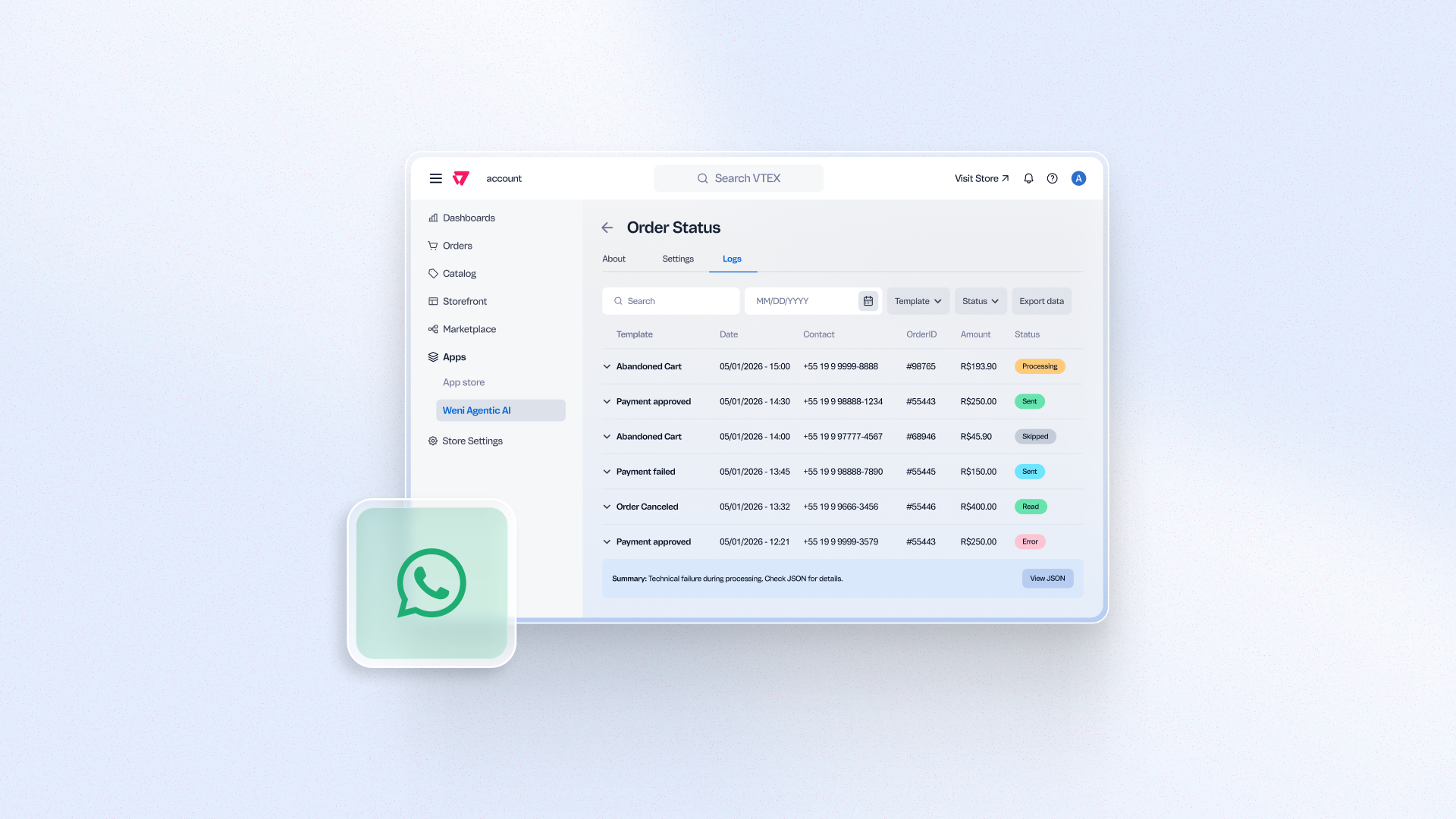
See the full execution history of your WhatsApp automations (WhatsApp Cart Recovery, WhatsApp Order Notifications, and WhatsApp Payment Recovery) in the Logs tab, which shows each message's template, contact, order, amount, and status. You can filter logs, expand them to see the JSON behind an error, and export logs by email. Stop guessing why a message wasn't sent and resolve issues on your own without needing to contact Support.
Benefits
- Self-service troubleshooting: Investigate failed or skipped messages without contacting Support
- Full traceability: See status, template, contact, and order details for every execution
- Faster resolution: View more details about errors and export logs for deeper analysis
- Fewer support tickets: Reduce escalations tied to "was this message sent" questions
How to use
In the VTEX Admin, go to WhatsApp Automations > Logs. Filter by contact, order, template, or status to find a specific execution, then expand any entry to see the full details or export the results by email.